
Table of Contents
5 Essential IT Relocation Checklist Tips for a Smooth Move
- Conduct a Thorough Assessment
- Develop a Detailed IT Relocation Strategy
- Coordinate With Corporate Relocation Experts
- Implement a Data Backup and Security Plan
- Test IT Systems Before and After Relocation
Optimize IT Relocation with Expert Support Today!
Key Takeaways✔ Evaluate existing IT infrastructure to identify risks and ensure a smooth transition. ✔ Develop a structured relocation strategy with clear timelines and responsibilities to minimize disruptions. ✔ Coordinate with corporate relocation experts to streamline logistics and ensure compliance with industry standards. ✔ Implement data backup and cybersecurity measures to prevent data loss and breaches during relocation. ✔ Test IT systems before and after relocation to identify issues and ensure business continuity. |
Planning an IT relocation requires a strategic approach to ensure minimal disruptions and seamless operations. From assessing current infrastructure to testing systems after the move, every step plays a crucial role in a successful transition. Partnering with corporate relocation experts helps businesses navigate challenges and execute a well-structured relocation plan.
Here are key steps to create an effective IT relocation plan with the support of corporate relocation experts.
5 Essential IT Relocation Checklist Tips for a Smooth Move
1. Conduct a Thorough Assessment
Relocating IT infrastructure requires careful planning to ensure a seamless transition. A thorough assessment of current systems, business needs, and potential risks is crucial for minimizing disruptions and maintaining operational efficiency.
Evaluate Current IT Infrastructure
A comprehensive evaluation of IT assets for corporate relocation management helps businesses determine what needs to be moved, upgraded, or replaced.
- Inventory of IT Assets: Conducting a detailed inventory of all IT equipment, including servers, workstations, network devices, and peripherals, helps in tracking assets and identifying outdated or redundant technology that may not need to be relocated.
- Assessment of Performance: Evaluating the current performance of IT systems allows businesses to determine whether upgrades or optimizations are needed before the move. Outdated systems can be replaced with more efficient technology to improve overall productivity.
- Compatibility Check: Ensuring that existing hardware and software are compatible with the new location’s infrastructure prevents potential integration issues. This includes checking for power supply requirements, network compatibility, and physical space constraints.
- Regulatory Compliance Review: Verifying that IT systems comply with industry regulations and security policies ensures that the relocation does not result in legal or operational issues. Executive relocation experts can assist in identifying compliance requirements specific to different industries.
Analyze Business Needs and Future Growth
An IT relocation plan should be designed not just for immediate needs but also for future scalability. Businesses should assess their long-term technology requirements and ensure that their new IT setup can support growth and evolving operational demands.
- Scalability Considerations: Companies should evaluate whether their new IT infrastructure can accommodate expansion in terms of additional users, increased data storage, and emerging technologies. Failing to plan for growth can result in costly upgrades soon after relocation.
- Operational Continuity: IT systems are essential for business operations, and any disruption can lead to lost revenue and productivity. Businesses should identify critical applications and services that must remain functional during the transition.
- Remote Work Integration: With the rise of hybrid and remote work models, businesses should ensure that their IT infrastructure supports secure remote access. Cloud-based solutions, VPN configurations, and mobile device management should be factored into the relocation plan.
- Security and Compliance Needs: Relocating IT systems introduces potential security risks, such as unauthorized data access and misconfigured security settings. Partnering with corporate relocation solutions providers ensures that security measures are in place before, during, and after the move.
Identify Potential Risks and Challenges
IT relocations come with a variety of risks that, if not properly addressed, can lead to downtime, data loss, and operational disruptions. Identifying potential challenges early allows businesses to develop contingency plans and minimize risks.
- Data Loss and Downtime Risks: Moving IT systems without a proper backup plan increases the risk of data loss or corruption. Hard drive failures and service outages are common causes of downtime, with service outages accounting for 22% of SaaS data loss. Establishing secure backups of all critical data and applications ensures that information can be quickly restored in the event of an issue.
- Connectivity Issues: IT infrastructure relies heavily on stable network connectivity. Before relocating, businesses should verify that the new site has sufficient internet bandwidth, network cabling, and power supply to support existing operations. Testing network configurations in advance reduces the risk of connectivity problems post-move.
- Hardware Damage: IT equipment is sensitive and can be easily damaged during transportation. Working with professional corporate movers who specialize in IT relocations ensures that servers, computers, and network devices are transported securely and reinstalled correctly.
- Security Threats: Data security must be a top priority during relocation, as improperly handled equipment or unattended devices can be vulnerable to unauthorized access. According to the Hiscox Cyber Readiness Report 2024, 43% of organizations lost existing customers due to cyberattacks, highlighting the critical need for robust security measures. Encrypting sensitive data, securing hardware, and implementing multi-layered security protocols help minimize risks and protect business continuity.
2. Develop a Detailed IT Relocation Strategy
Relocating IT infrastructure requires a well-planned strategy to prevent disruptions and ensure a seamless transition. A structured approach with clear timelines, assigned responsibilities, and expert guidance from professional corporate movers is essential.
Create a Step-by-Step Plan With Clear Timelines
A structured timeline is crucial for a successful IT relocation. It helps businesses track progress, manage risks, and ensure a smooth transition. Breaking the process into manageable phases allows for better coordination and minimizes downtime.
- Assessment and Planning: Conduct a thorough evaluation of current IT infrastructure, identify potential challenges, and determine business needs for the new location.
- Timeline Development: For comprehensive corporate relocation management, establish a realistic timeline for each phase of the relocation, including system shutdown, equipment transport, and setup at the new site.
- Risk Management: Identify potential risks, such as data loss or hardware damage, and create contingency plans to mitigate them.
Assign Responsibilities to Key Team Members
Delegating tasks to designated team members enhances efficiency and ensures accountability throughout the relocation process. Each individual should have a clear role to prevent confusion and delays.
- Project Manager: Oversees the entire relocation process, coordinates with departments, and ensures all tasks align with the project timeline.
- IT Team: Handles data migration, infrastructure setup, and network testing to ensure minimal disruption during the move.
- Security Specialist: Ensures that cybersecurity measures are in place before, during, and after the relocation to protect sensitive business data.
- Employee Training Lead: Assists employees in adapting to the new IT setup, offering guidance on system changes and troubleshooting.
3. Coordinate With Corporate Relocation Experts
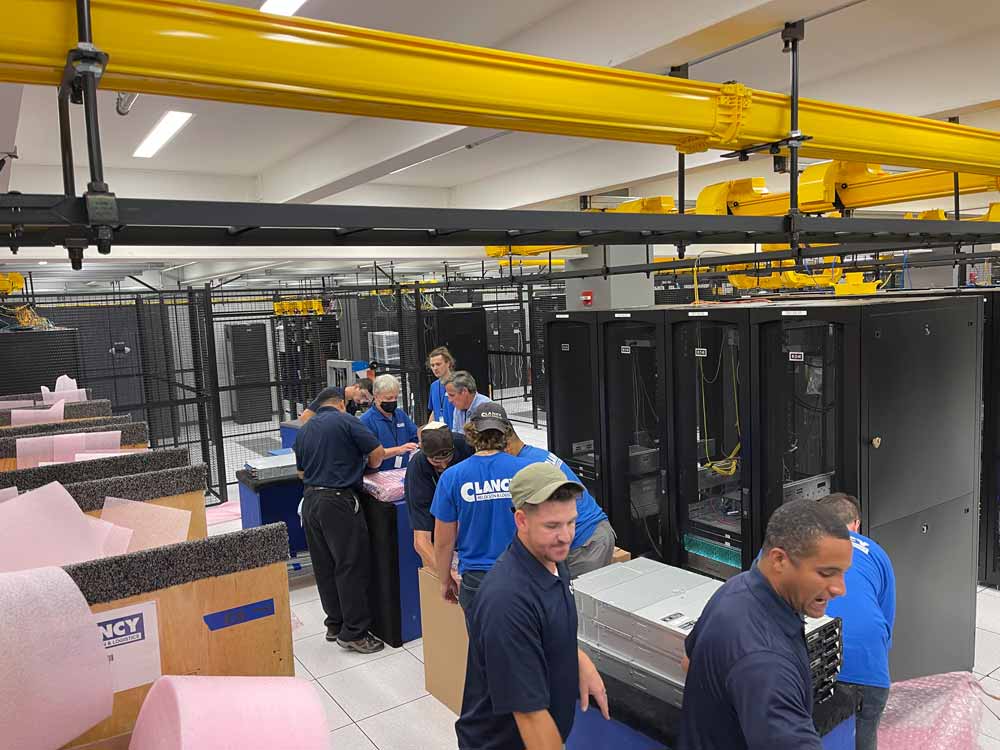
Relocating IT infrastructure is a critical process that requires careful planning and expert handling. Any missteps can result in extended downtime, data loss, or security risks that could impact business operations.
Leverage Expertise for Seamless Planning and Execution
Relocating IT systems is not just about moving hardware—it involves intricate planning, risk assessment, and coordination to ensure business continuity. Executive relocation experts bring in-depth knowledge and hands-on experience to manage the process efficiently.
- Comprehensive IT Assessment: Before relocation, experts conduct a thorough evaluation of the existing IT infrastructure. This includes assessing the condition of servers, networking equipment, and software systems to determine compatibility with the new location. Any outdated or inefficient technology can be identified for upgrades before the move.
- Customized Relocation Strategy: No two businesses have the same IT needs. Corporate relocation solutions professionals develop a relocation plan that aligns with the company’s specific requirements. This includes setting timelines, allocating resources, and outlining contingency plans to avoid operational disruptions.
- Logistical Coordination: The physical transport of IT assets requires specialized handling to prevent damage or loss. Professional corporate movers ensure the safe packing, transportation, and reinstallation of hardware at the new site. They follow industry best practices to protect fragile equipment such as servers, desktops, and network components.
- Risk Mitigation Planning: IT relocations carry inherent risks, such as potential data loss, network failures, or hardware malfunctions. Experts analyze these risks in advance and develop contingency plans. Backup systems, redundancy measures, and emergency response plans are put in place to minimize unforeseen issues.
Ensure Compliance With Industry Regulations And Best Practices
IT relocations are subject to strict compliance requirements, particularly for industries dealing with sensitive data such as healthcare, finance, and government sectors. Failure to adhere to regulatory standards can result in legal penalties, data breaches, or loss of client trust.
- Data Protection Measures: Data security is a top priority during relocation. Experts implement stringent security measures to protect sensitive business information, including encryption, secure data transfers, and controlled access to IT assets. Compliance with data protection laws, such as GDPR, HIPAA, or PCI-DSS, ensures that customer and business data remain secure.
- IT Infrastructure Compliance: New IT setups must adhere to industry-specific standards and operational guidelines. Experts verify that all hardware and software configurations meet regulatory requirements. This includes ensuring proper ventilation for servers, securing network connections, and optimizing IT infrastructure for efficiency.
- Post-Relocation Audits: After relocation, a comprehensive audit is conducted to assess compliance with security and operational standards. This includes reviewing data integrity, verifying system functionality, and ensuring that IT assets are properly configured to support business operations.
4. Implement a Data Backup and Security Plan
A well-structured data backup and security plan is essential for a successful IT relocation. Businesses must take proactive steps to protect sensitive information and ensure continuity during the move.
Secure Critical Data Before the Move
Protecting business data should be a top priority before any IT relocation. Data loss, corruption, or breaches can lead to operational disruptions and financial setbacks.
- Conduct a Comprehensive Data Audit: Identify and categorize critical data, including customer records, financial documents, and proprietary information. This helps determine what needs to be prioritized during the move.
- Create Multiple Backup Copies: Store data backups in secure locations, including cloud storage and external drives. This ensures redundancy in case of hardware failures or accidental losses.
- Establish Access Controls: Limit data access to authorized personnel only. Implement role-based permissions to reduce the risk of data leaks or internal security breaches.
Establish Cybersecurity Measures to Prevent Data Breaches
During relocation, IT infrastructure is more vulnerable to cyber threats. Proper cybersecurity measures should be in place to prevent data breaches and ensure compliance with industry regulations.
- Use Secure Transfer Protocols: Ensure that all data transfers, whether through physical or digital means, are conducted using secure encryption methods. This protects files from unauthorized interception.
- Monitor Network Security: Set up firewalls, intrusion detection systems, and endpoint protection before, during, and after the move. These tools help detect and prevent potential cyber threats.
5. Test IT Systems Before and After Relocation
Ensuring IT systems function properly before and after relocation is crucial for minimizing downtime and preventing operational disruptions. A comprehensive testing process helps businesses identify potential issues, address them in advance, and verify system functionality post-move.
Conduct Pre-Move Testing
Pre-move testing is essential for identifying vulnerabilities and ensuring all IT systems are prepared for the relocation process. This step allows businesses to detect and fix potential issues before they disrupt operations.
- Assess Current System Performance: Evaluate existing IT infrastructure to document system configurations, network settings, and software dependencies. This helps establish a baseline for post-move comparisons.
- Perform Network and Server Tests: Run diagnostics on network connectivity, server performance, and data storage systems to identify any weaknesses that could affect functionality after the move.
- Test Backup and Recovery Plans: Ensure data backup solutions are in place and functional. Conduct a test recovery to verify that critical data can be restored in case of unexpected failures.
- Simulate the IT Relocation Process: Work with executive relocation experts to create a test scenario that mimics the relocation process. This helps uncover technical issues that could arise during the move.
- Develop a Contingency Plan: Outline alternative solutions for potential risks identified during testing, such as temporary IT support or backup systems, to avoid disruptions.
Perform Post-Move Validation
Once IT systems have been relocated, post-move validation ensures everything is operational and functioning as expected. This step is critical to resuming business activities without unnecessary delays.
- Verify Hardware and Cable Connections: Inspect all relocated equipment to confirm that servers, workstations, and network devices are properly set up and connected.
- Check Network and Internet Connectivity: Run tests to confirm stable internet access, VPN functionality, and network security to prevent downtime.
- Validate Data Integrity and Software Functionality: Confirm that all critical data remains intact and that business applications work without errors after the move.
- Test Communication Systems: Ensure that phone systems, VoIP services, and email platforms are fully operational to maintain seamless communication.
- Conduct Employee IT Training: Provide brief training sessions or support to employees on any system changes or new setups, ensuring they can quickly adapt to the new IT environment.
Frequently Asked Questions
What happens if IT equipment gets damaged during the move?
If IT equipment gets damaged, businesses need a contingency plan to minimize the impact. Having coverage can help recover costs for repairs or replacements. In some cases, backup equipment can be used while damaged items are fixed. If critical hardware like servers are affected, IT teams should have a recovery plan in place. Keeping extra cables, monitors, and spare components can also help with quick replacements.
Do I need special packing for IT equipment?
Yes, IT equipment is sensitive and should be packed carefully to prevent damage. Anti-static bags, foam padding, and sturdy boxes help protect fragile components. Cables should be labeled and packed separately to avoid tangling and confusion during setup. It’s also advisable to transport critical hardware like servers in climate-controlled vehicles. Proper labeling of each box ensures easy unpacking and setup.
What should I do with old or unused IT equipment?
Before moving, businesses should assess their IT equipment to determine what is still needed. Old or outdated devices can be recycled, donated, or properly disposed of according to e-waste regulations. Some companies sell used equipment to recover costs. If sensitive data is stored on old devices, it should be securely wiped before disposal.
Can employees continue working during an IT move?
It depends on the scale of the move and the company’s setup. If only part of the IT infrastructure is being moved, employees may still work using remote access or temporary setups. In some cases, businesses schedule moves outside of regular working hours to minimize downtime. Cloud-based systems and laptops can help keep employees productive during the transition. However, if the entire IT system is being relocated, there may be a temporary pause in operations..
How long does an IT move take?
The duration of an IT move depends on the size of the business and the complexity of the IT infrastructure. A small office with a few computers may take a single day, while a large enterprise move can take weeks. Planning and preparation play a significant role in reducing downtime. If everything is organized well, the transition can be completed efficiently. However, unexpected challenges like internet setup delays or hardware issues may extend the timeline.
Optimize IT Relocation with Expert Support Today!
Ensure a seamless and efficient IT relocation process with Clancy Relocation & Logistics. With a proven track record in corporate relocation management, the team handles every detail, from pre-move assessments to post-move system validation. Minimize downtime, protect critical data, and keep business operations running smoothly with professional expertise.
Contact Clancy Relocation & Logistics today to discuss tailored corporate relocation solutions.